Home
english
Home
WebDAV Server
WebDAV Client
WebDAV AJAX
Map Drive
Pricing
News
Contacts
info@ithit.com


Connect to WebDAV server on Mac OS X

To connect to WebDAV server on Mac OS X, use Finder Go->Connect to Server command. Type the address of the WebDAV server in the Server Address field:
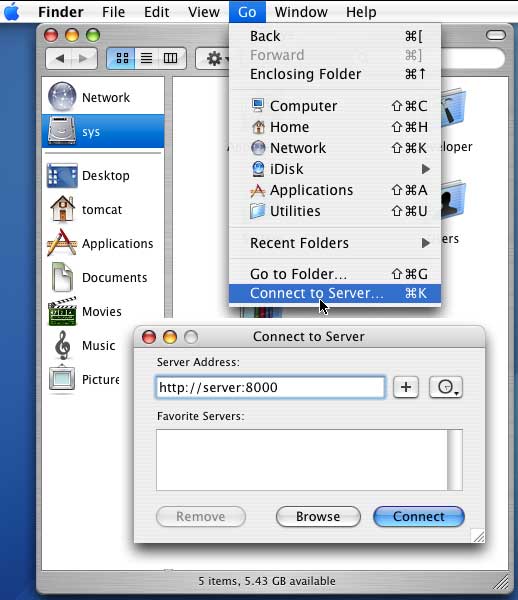


Note that your server must be Class 2 compliant. Mac OS X WebDAV client will not allow file structure modifications on a Class 1 WebDAV server.


What WebDAV software would you like to have?

Selected Customers:
Country: Norway
DnB NOR Group
Country: Finland
Bank of Finland
Country: United Kingdom
Bechtle Direct
Country: Sweden
BT Industries
Country: USA
California Chamber of Commerce
Country: Denmark
Danfoss Group
Country: Denmark
DFDS
Country: USA
Fluke Networks
Country: USA
HNI Corporation
Country: USA
IHS Inc
Country: USA
LandAmerica Financial Group
Country: Canada
Laurentian University
Country: USA
Microsoft
Country: Israel
RADVISION
Country: Ukraine
Raiffeisen Bank
Country: Netherlands
Sanoma Uitgevers
Country: USA
Siemens
Country: Australia
WorkCover NSW
Country: Ukraine
OTP Bank
Country: USA
Intel Corporation
Country: Austria
Austrian Federal Railways
Home WebDAV Server WebDAV Client WebDAV AJAX Map Drive Pricing News Contacts

Updated: Thursday, August 09, 2007