Connect to WebDAV Server on iPad using iWork
In this article
Connect to WebDAV Server on iPad using iWork
On iPad you can use iWork applications (Pages, Keynote or Numbers) to save and open documents from WebDAV server.
Note that iOS 4.2.1 or later is recommended. While iWork on iOS 3.2.2 has WebDAV support it allows only default HTTP port 80 and HTTPS port 443. If you specify any other port the 'An error occurred. Please try again.' message is displayed. On earlier iOS versions, WebDAV is not supported.
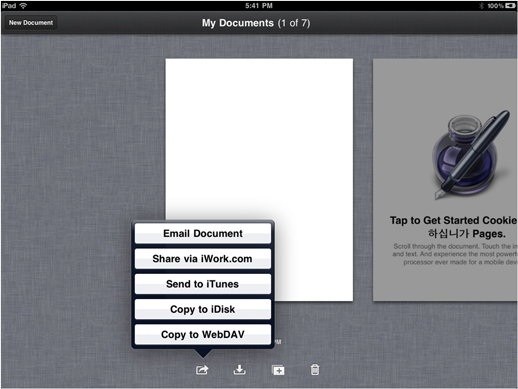
All 3 applications has similar WebDAV functionality, so we describe how to connect from iPad Pages only. To save iWork Pages document to WebDAV server go to 'My Documents' and select 'Copy to WebDAV'.
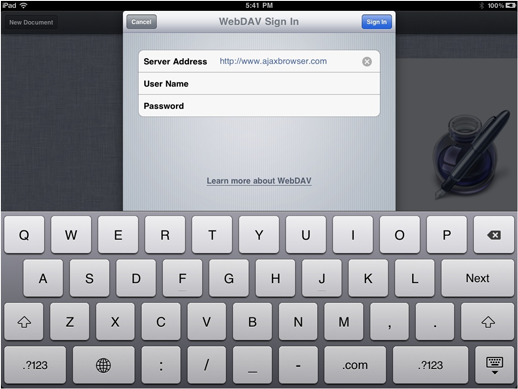
The 'WebDAV Sign In' dialog will appear. Fill in Server Address, User Name and Password fields and click 'Sign In' button.
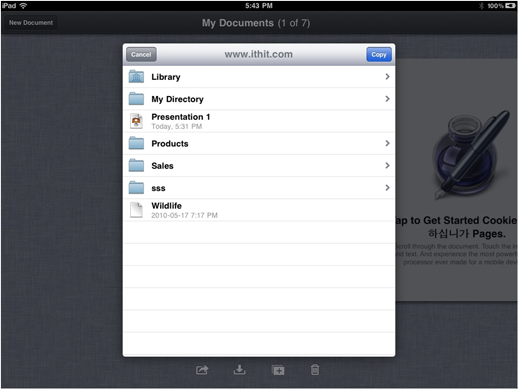
You will see the list of folders and documents on your WebDAV server. Navigate to the folder in which you would like to save the document and click 'Copy' button.