
|

|

|
 |
Connecting to WebDAV server using Gnome Nautilus
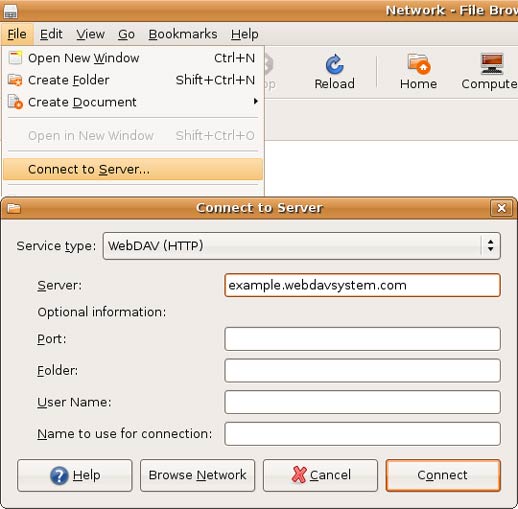
To connect to WebDAV server using Nautilus, in File menu select Connect to Server. In the Service Type field select WebDAV (HTTP) or Secure WebDAV (HTTPS) and fill in at last Server field.
|
 |

Selected Customers:
| Country: Norway |
 |
| DnB NOR Group |
| Country: Finland |
 |
| Bank of Finland |
| USA |
 |
| Symantec |
| Country: Sweden |
 |
| Toyota |
| Country: Denmark |
 |
| Danfoss Group |
| Country: USA |
 |
| Microsoft |
| Country: Ukraine |
 |
| Raiffeisen Bank |
| Country: USA |
 |
| Siemens |
| Country: Ukraine |
 |
| OTP Bank |
| Country: USA |
 |
| Intel Corporation |
| Country: Austria |
 |
| Austrian Federal Railways |
| Country: Israel |
 |
| Autodesk, Inc. |
| Country: USA |
 |
| U.S. Customs and Border Protection Agency |
|
|
 |
|