Creating Class 2 / Class 3 WebDAV Server in Java
In addition to features provided by Class 1 / Class 3 WebDAV server, Class 2 / Class 3 WebDAV server supports files and folders locking.
Locking is required to protect the item from being modified by other users. Many WebDAV clients such as Microsoft Web Folders, Mac OS X WebDAV client and Microsoft Office require Class 2 WebDAV server.
To create a Class 2 / Class 3 server, you must implement Lock interface on your folder and file items. Also before updating file content or item custom properties as well as when copying, moving and deleting an item you must verify if the client provided a valid lock-token.
How WebDAV Client Discovers Server Compliance
When discovering WebDAV item compliance many WebDAV clients rely on DAV header returned with OPTIONS request. After you implement Lock interface on an item the server will respond with DAV: 1, 2, 3 header, meaning the item supports locking. The server will also return LOCK and UNLOCK verbs in Allow and Public headers.
As soon as some WebDAV clients may rely on DAV or Allow / Public headers returned in response to folder item, it is recommended to add Lock interface on a folder items even if you do not plan to implement lock methods on folders.
Locking the Item
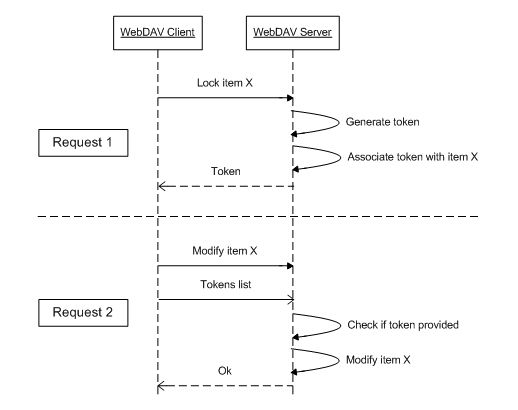
Lock interface provides the means for locking the hierarchy item, updating lock timeout and accessing the list of applied locks. When WebDAV client issues lock the request WebDAV engine calls Lock.lock() method passing information about requested lock. In your lock() implementation, you must generate the new lock-token (usually a GUID), associate the lock-token with the item in the repository and return the lock-token to the engine. Optionally in your lock() implementation you can modify the timeout. The engine then sends lock and timeout values back to WebDAV client.
 public LockResult lock(boolean shared, boolean deep, long timeout, String owner)
            throws LockedException, MultistatusException, ServerException {
        if (itemHasLock(shared))
            throw new LockedException();

        if (deep) { // check if no items are locked in this subtree
            checkNoItemsLocked(this, shared);
        }

        String token = UUID.randomUUID().toString();
        Calendar calendar = Calendar.getInstance();
        calendar.setTime(new Date());
        calendar.add(Calendar.SECOND, (int) timeout);
        Timestamp expires = timeout >= 0 ? new Timestamp(calendar.getTimeInMillis()) : null;

        getDataAccess().executeUpdate("INSERT INTO Locks (ItemID,Token,Shared,Deep,Expires,Owner)"
                + " VALUES(?, ?, ?, ?, ?, ?)",
                getId(), token, shared, deep, expires, owner);
        return new LockResult(token, timeout);
    }

    protected boolean itemHasLock(boolean skipShared) throws ServerException {
        List<LockInfo> locks = getActiveLocks();
        if (locks.size() == 0)
            return false;
        return !(skipShared && locks.get(0).isShared());
    }

    protected void checkNoItemsLocked(HierarchyItemImpl root, boolean skipShared)
            throws ServerException, MultistatusException {

        MultistatusException mr = new MultistatusException();
        checkNoItemsLocked(mr, root, skipShared);
        if (mr.getResponses().length > 0)
            throw mr;
    }

    protected void checkNoItemsLocked(MultistatusException mr, HierarchyItemImpl root, boolean skipShared)
            throws ServerException {

        FolderImpl folder = root instanceof FolderImpl ? (FolderImpl) root : null;
        if (folder != null)
            for (HierarchyItemImpl child : folder.getChildren()) {
                if (child.itemHasLock(skipShared))
                    mr.addResponse(child.getPath(), WebDavStatus.LOCKED);
                checkNoItemsLocked(mr, child, skipShared);
            }
    }
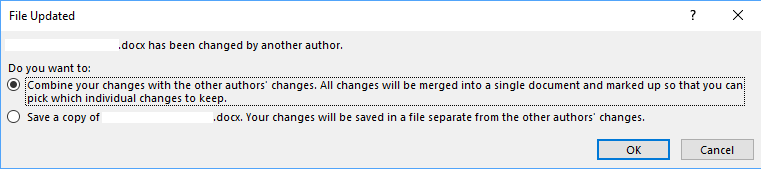
Important! During lock, unlock and lock refreshing requests your file modification date must NOT change. If the file modification date changes and you have Protected View enabled, Microsoft Office displays the "File updated. <File> has been changed by another author." dialog:
Lock Parameters
The shared argument specifies if the client is requesting an exclusive or shared lock. If the user set exclusive lock other users will not be able to set any locks. If the user set shared lock other users will be able to set only shared lock on the item. There could be only 1 exclusive lock set on an item or it can have 1 or more shared locks. If the item is locked and the new lock can not be applied you can throw LockedException, this will inform the client about lock conflict on the server.
The deep argument specifies if the lock should be applied only to this item or to the entire subtree. In the case of deep lock (no matter shared or exclusive), you must verify if no exclusive lock is applied to any child item. In the case of deep exclusive lock, you must verify if no shared lock is applied to any child item. If any lock conflicts occur, to provide WebDAV client with information about locked children, you can throw MultistatusException with information about each locked child item.
The lock must be automatically removed by the server after an amount of time specified in a timeout parameter are elapsed. A negative value means infinite lock, that should not be removed automatically. You can set the timeout that is different from the one requested by the client. The actual timeout that you apply must be returned to the framework via LockResult return value together with the generated lock-token. The WebDAV framework will then return the updated timeout to WebDAV client.
The owner argument specifies the name of the user applying the lock. Note that this is only an informational sting provided by WebDAV client and it cannot be used for security purposes. To get the name of authenticated user, you must use other mechanisms.
Refreshing Lock
The WebDAV client can change the lock timeout at later times. In this case, the framework will call Lock.refreshLock method providing the lock-token and new timeout value. Again in this method you can set the timeout that is different from the one requested by the client.
Updating the Locked Item
When WebDAV client is updating a locked item, it sends to the server the list of lock-tokens. You can access these tokens on the server side via Engine.getClientLockTokens method call. In your WebDAV server Class 2 / Class 3 implementation before modifying any locked items you must check if WebDAV client provided necessary lock-token for this item. If no valid lock-token was provided you must throw LockedException.
public void createFolder(String name) throws LockedException, ServerException {
    if (!clientHasToken())
        throw new LockedException();
...
}
public boolean clientHasToken() throws ServerException {
    List<LockInfo> itemLocks = getActiveLocks();
    if (itemLocks.size() == 0)
        return true;
    List<String> clientLockTokens = getEngine().getClientLockTokens(getEngine().getRequest());
    for (String clientLockToken : clientLockTokens)
        for (LockInfo itemLock : itemLocks)
            if (clientLockToken.equals(itemLock.getToken()))
                return true;
    return false;
}
Listing Locks
The WebDAV client application can request the list of locks applied to the item. In this case framework calls Lock.getActiveLocks() method:
public List<LockInfo> getActiveLocks() throws ServerException {
    int itemId = getId();
    ArrayList<LockInfo> l = new ArrayList<LockInfo>();

    l.addAll(getLocks(getId(), false)); // get all locks
    while (true) {
        Integer res = getDataAccess().executeInt("SELECT Parent FROM Repository WHERE ID = ?", itemId);
        if (res == null)
            break;
        itemId = res;
        if (itemId <= 0)
            break;
        l.addAll(getLocks(itemId, true));  // get only deep locks
    }

    return l;
}

private List<LockInfo> getLocks(int itemId, boolean onlyDeep) throws ServerException {
    if (onlyDeep)
        return getDataAccess().readLocks("SELECT Token, Shared, Deep, Expires, Owner"
                + " FROM Locks"
                + " WHERE ItemID = ?"
                + " AND Deep = ?", itemId, true);
    else
        return getDataAccess().readLocks("SELECT Token, Shared, Deep, Expires, Owner FROM Locks WHERE ItemID = ?", itemId);
}