Creating DeltaV WebDAV Server
DeltaV Classes and Interfaces
DeltaV server provides the ability to check-out / check-in resources and keeps versions track. To add versioning features, you must implement 3 additional interfaces: VersionableItem, Version and History. The class diagram below shows DeltaV interfaces that you will usually use to build DeltaV server. Interfaces specific to various server features are marked as Class 1, Class 2 and DeltaV:
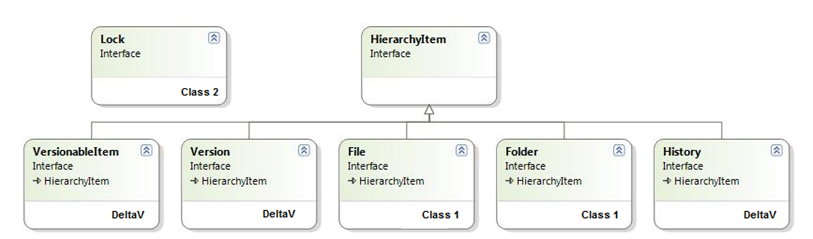
Class 2 interfaces are optional for DeltaV server, if you do not need to support Class 2 clients (such as Web Folders on Vista, Mac OS X, Microsoft Office, etc) you do not have to implement them. Class 2 interfaces will be also necessary if you would like to implement auto-versioning modes for versioning-unaware WebDAV clients.
Usually, you will implement VersionableItem on your resource items in addition to File and Lock interfaces. You will also provide 2 new item types – version and history items. Your version items will implement Version and File interface representing a single file version. History item will contain all versions of an item. The class diagram below shows classes in your application supporting both Class 2 and DeltaV:
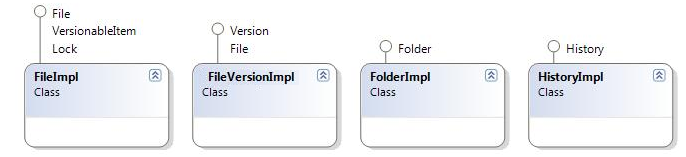
As with Class 1 and Class 2 servers, each item in your repository must have its own unique URL including versions and history items. Now your Engine.getHierarchyItem must return 4 types of items: files, folders, versions and history item.
Starting Versioning
Usually by default all items in the repository are not under version control. The item actually behaves like a Class 2 item. To start creating versions, DeltaV client application must first issue a version-control command for an item. The engine will call VersionableItem.putUnderVersionControl method passing true as a parameter. If you want versioning to start automatically without an explicit request from the client then Engine.getAutoPutUnderVersionControl must return true. In this case, VersionableItem.putUnderVersionControl will be called for non-version controlled items before the first item update.
In your VersionableItem.putUnderVersionControl implementation, you must create a new version. You will copy content and properties from the item to newly created version and save the new version in your repository. After the call to putUnderVersionControl, the item must have 1 version in its versions list and VersionableItem.getVersionHistory must return an object implementing the History interface that contains a single version. History.getCurrentVersion must point to the new version.
Updating Item Content and Properties
To start updating item, the client application must check-out the item. In your VersionableItem.checkOut implementation, you will mark the item as checked-out and allow item modifications. When the item is in check-out state WebDAV client can issue commands updating item contents and properties. During the updates, the engine will call File.write and HierarchyItem.updateProperties.
You should not create any new versions during VersionableItem.checkOut call or during the updates. Instead, you will create a new version during VersionableItem.checkIn call.
When the client finishes item updates it will check-in item or rollback modifications issuing the uncheck-out command. During the VersionableItem.checkIn call you must create a new version copying content and properties from modified item to a new version.
If the client issues uncheck-out command you must restore the pre-check-out stare of the item. In this case during VersionableItem.uncheckOut call you will copy content and properties from the latest version to the item. During the VersionableItem.uncheckOut call item must be marked as checked-in.
Here is the typical versioning workflow:
- Engine calls putUnderVersionControl. You must create a new version, copy content and properties from this item to a new version.
- Engine calls checkOut. You mark the item as checked-out.
- Engine calls write or updateProperties. You modify item content and properties.
- Engine calls checkIn or unCheckOut. For checkIn - create a new version, copy content and properties from this item to a new version. For unCheckOut - copy content and properties from the current version to this item. Mark item as checked-in.
Stopping Versioning
Each object that implements History interface must have its own unique URL returned by getPath method. If the DeltaV client application decides to turn-off versioning it will submit delete request to this URL. Engine will call VersionableItem.putUnderVersionControl method passing false as a parameter. In your implementation, you will delete all versions. VersionableItem.getVersionHistory method must return null after this call.
Auto-versioning Modes
Auto-versioning provides backward compatibility with WebDAV clients that do not support DeltaV features (versioning-unaware WebDAV clients). If your item is being version-controlled and WebDAV client is trying to modify a checked-in item auto-versioning may automatically check-out the item and then check-in creating a new item version. To reduce number of versions created by versioning-unaware clients DeltaV standard and IT Hit WebDAV Server Engine provides several auto-versioning modes. The engine reads the mode from VersionableItem.getAutoVersion method before the update. Note that all auto-versioning logics apply only to checked-in items. If you the item is in checked-out state and your server permissions allow the user to modify the item the client application will be able to update items content and properties.
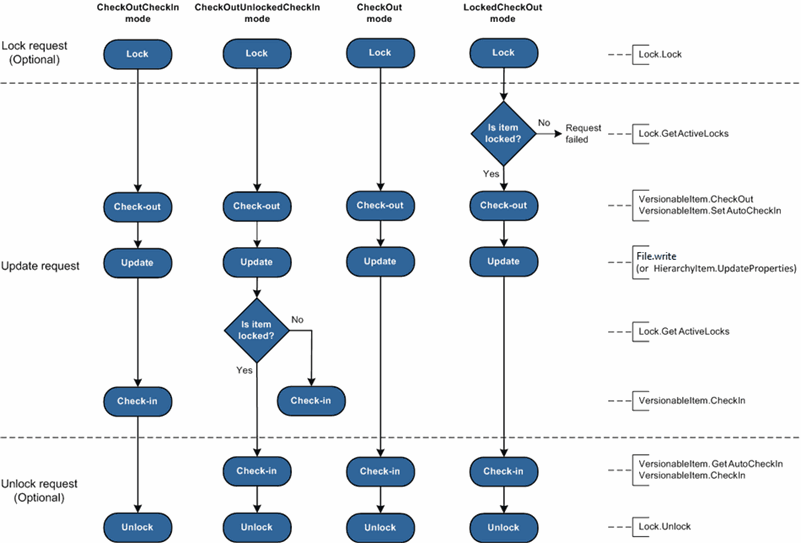
We will describe CheckOutUnlockedCheckIn mode that provides a balance between number of versions created and support for versioning-unaware clients. In this mode lock and unlock commands function as check-in/check-out. On the other hand Class 1 client applications without lock support can still update items and create versions.
When the update request issued, the item is being automatically checked-out by the engine. First the engine calls VersionableItem.setAutoCheckIn property with true and calls VersionableItem.checkOut. Then engine calls item update methods File.write or HierarchyItem.updateProperties. After the update, engine checks-in the item if it was not locked.
If the item was locked, during the unlock request engine first reads autoCheckIn property and calls VersionableItem.checkIn if it is true. Finally engine calls Lock.unlock.
CheckOutUnlockedCheckIn mode workflow:
- Modification request:
- Engine calls VersionableItem.checkOut.
- Engine sets VersionableItem.autoCheckIn property.
- Engine calls File.write or HierarchyItem.updateProperties.
- Engine calls VersionableItem.checkIn if item is not locked.
- Unlock request:
- Engine reads VersionableItem.autoCheckIn property.
- Engine calls VersionableItem.checkIn if VersionableItem.autoCheckIn istrue.
- Engine calls Lock.unlock.
Below you can see the how other 3 auto-versioning modes comparing to CheckOutUnlockedCheckIn mode: