Working with Image Thumbnails in AJAX Browser
How Images Preview are Requested
The Ajax File Browser provides several modes in which it displays image thumbnails.
There is no need to generate thumbnails on the server side to display a resized image. The AJAX File Browser and user agent correctly processes and resize images of any size on a client side.
However, if you would like to minimize bandwidth, your server can generate necessary thumbnail and return it instead of the original image. When requesting an image thumbnail the AJAX File Browser adds width and height arguments to query string:
http://webdavserver.com/image.gif?width=42&height=42
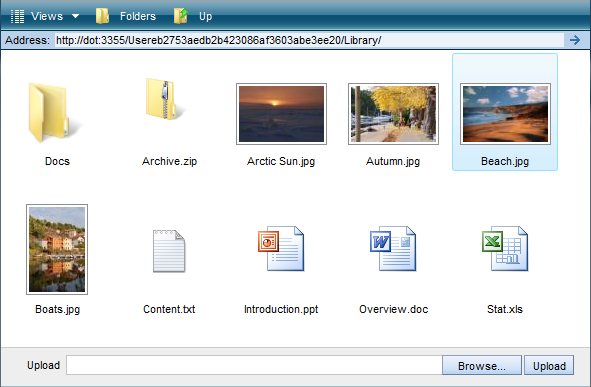
The AJAX File Browser displays images of the following size: 42x42px, 85x85px, 232x232px. To programmatically set view mode call SetViewMode passing necessary view mode:
ajaxFileBrowser.SetViewMode('Large');
The SetViewMode accepts following text constants: Details, Medium, Large, ExtraLarge. To get the view mode call GetViewMode method.
How to Turn off Image Preview
To display an icon instead of thumbnail call SetShowImagePreview method and pass false as an argument:
ajaxFileBrowser.SetShowImagePreview(false);
ajaxFileBrowser.Refresh();
To read the this setting use GetShowImagePreview method. To redraw the view call Refresh method.
Setting List of File Extensions for Image Preview
To set the list of file types for which AJAX File Browser will request and generate image previews call SetImageTypes method and pass string containing the list of file extensions separated by '|' symbol:
ajaxFileBrowser.SetImageTypes('png|jpg|jpeg|gif');
To read the list of file types use GetImageTypes method. By default, AJAX File Browser generates thumbnails for png, jpg, jpeg, gif, BMP and tiff images.
For all files that are not included in the list returned by GetImageTypes, file icons are displayed. The file icons are stored in subfolders of icons\ folder in png format. You can add more icons to this folder or delete unnecessary icons. If no appropriate icon is found the default file icon is displayed.
AJAX File Browser Control Image Preview Demo
Setting Image Thumbnails / Icons Mode
When creating AJAX File Browser you can specify the mode in which to display image thumbnails. To set the mode use the ViewMode attribute.
For image files, in the thumbnails modes, the Ajax File Browser can display either default file icons or image thumbnails. The default file icons are loaded from the path specified by FileIconsPath. To set the list of file types for which AJAX File Browser will create thumbnails use the ImageTypes attribute. To display default file icons instead of image thumbnails set the ShowImagePreview property to false.
You can also specify if folders should be displayed in Files View panel. Use the ShowFolders attribute for this purpose.
var settings = {
    BasePath: '/',                      // path to ajax file browser files
    Id: 'AjaxFileBrowserContainer',     // ID of the parent control
    Url: 'http://webdavserver.com',     // WebDAV server Url
    Style: 'height: 100%; width: 100%',
    MsOfficeTemplatesPath: 'http://webdavserver.com/MSOfficeTemplates/',
    SelectedFolder: '/Pictures',        // folder to be selected
    ShowFolders: false,                 // show/hide folders in Files View panel
    ViewMode: 'Large',                  // view mode
    ShowImagePreview: true,             // true - show thumbnails for images, false - show icons
    ImageTypes: 'png|jpg|jpeg|gif',     // show thumbnails for this image types
}
A working example of Files View panel customization could be found here.